ad blue Ram 1500 2013 Get to Know Guide
[x] Cancel search | Manufacturer: RAM, Model Year: 2013, Model line: 1500, Model: Ram 1500 2013Pages: 196, PDF Size: 9.66 MB
Page 101 of 196
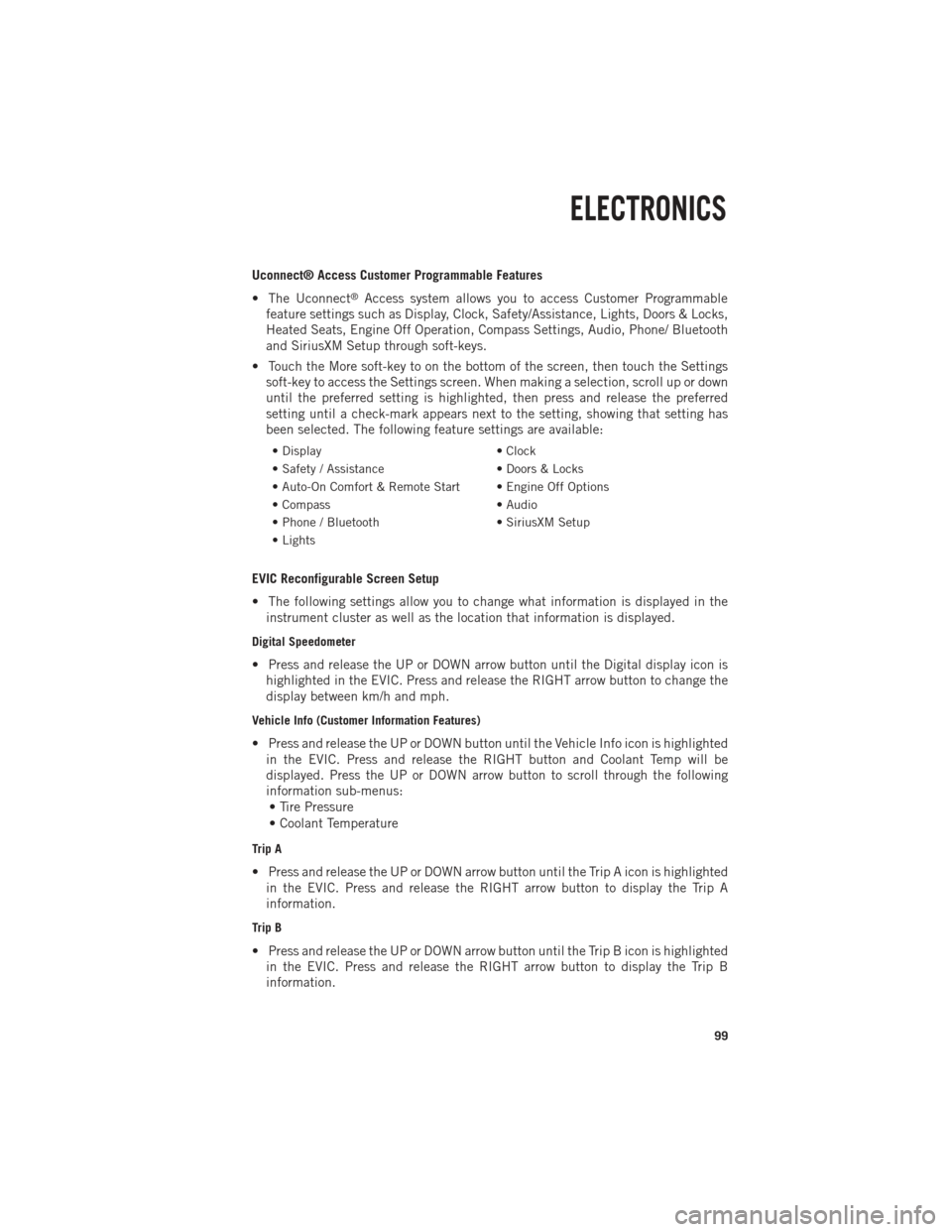
Uconnect® Access Customer Programmable Features
• The Uconnect
®Access system allows you to access Customer Programmable
feature settings such as Display, Clock, Safety/Assistance, Lights, Doors & Locks,
Heated Seats, Engine Off Operation, Compass Settings, Audio, Phone/ Bluetooth
and SiriusXM Setup through soft-keys.
• Touch the More soft-key to on the bottom of the screen, then touch the Settings soft-key to access the Settings screen. When making a selection, scroll up or down
until the preferred setting is highlighted, then press and release the preferred
setting until a check-mark appears next to the setting, showing that setting has
been selected. The following feature settings are available:
• Display • Clock
• Safety / Assistance • Doors & Locks
• Auto-On Comfort & Remote Start • Engine Off Options
• Compass • Audio
• Phone / Bluetooth • SiriusXM Setup
• Lights
EVIC Reconfigurable Screen Setup
• The following settings allow you to change what information is displayed in the instrument cluster as well as the location that information is displayed.
Digital Speedometer
• Press and release the UP or DOWN arrow button until the Digital display icon ishighlighted in the EVIC. Press and release the RIGHT arrow button to change the
display between km/h and mph.
Vehicle Info (Customer Information Features)
• Press and release the UP or DOWN button until the Vehicle Info icon is highlightedin the EVIC. Press and release the RIGHT button and Coolant Temp will be
displayed. Press the UP or DOWN arrow button to scroll through the following
information sub-menus:• Tire Pressure
• Coolant Temperature
Trip A
• Press and release the UP or DOWN arrow button until the Trip A icon is highlighted in the EVIC. Press and release the RIGHT arrow button to display the Trip A
information.
Trip B
• Press and release the UP or DOWN arrow button until the Trip B icon is highlightedin the EVIC. Press and release the RIGHT arrow button to display the Trip B
information.
ELECTRONICS
99
Page 181 of 196

Cavity Cartridge Fuse Micro FuseDescription
F25 30 Amp Pink Front Wiper High Speed
F26 30 Amp Pink Antilock Brakes/Stability Control
Module/Valves
F28 20 Amp Yellow Trailer Tow Backup Lights –
If Equipped
F29 20 Amp Yellow Trailer Tow Parking Lights –
If Equipped
F30 30 Amp Pink Trailer Tow Receptacle
F32 30 Amp Pink Drive Train Control Module –
If Equipped
F33 20 Amp Yellow Diesel Fuel Heater #1 –
If Equipped / Rear Blower – If Equipped
F34 30 Amp Pink Vehicle System Interface
Module #2 – If Equipped
F35 30 Amp Pink Sunroof – If Equipped
F36 30 Amp Pink Rear Defroster– If Equipped
F37 30 Amp Pink Diesel Fuel Heater #2 if equipped
F38 30 Amp Pink Power Inverter 115V AC –
If Equipped
F39 30 Amp Pink Vehicle System Interface
Module #1– If Equipped
F41 10 Amp RedActive Grill Shutter
F42 20 Amp Yellow Horn
F43 10 Amp Red Snow Plow (Left) – If Equipped
F44 10 Amp RedDiagnostic Port
F46 10 Amp Red Tire Pressure Monitor
F47 10 Amp Red Snow Plow (Right) – If Equipped
F49 10 Amp Red Instrument Panel Cluster
F50 20 Amp Yellow Air Suspension Control Module –
If Equipped
F51 10 Amp Red Ignition Node Module / Keyless
Ignition
F52 5 Amp TanBattery Sensor
F53 20 Amp Yellow Trailer Tow – Left Turn/Stop Lights
F54 20 Amp Yellow Adjustable Pedals
F55 20 Amp Yellow E38 Radio – If Equipped
F56 15 Amp Blue Additional Diesel Content –
If Equipped
F57 20 Amp YellowTransmission
MAINTAINING YOUR VEHICLE
179
Page 182 of 196
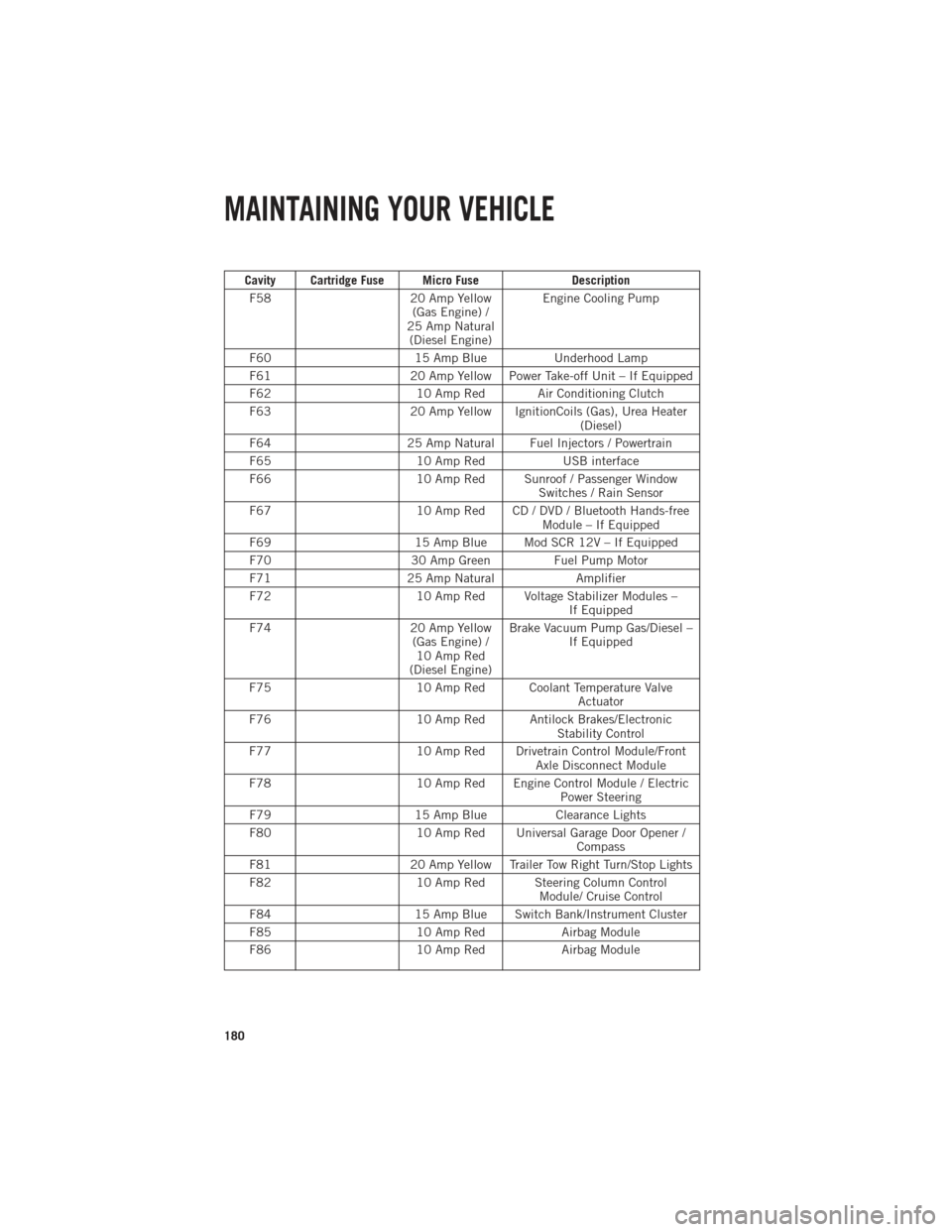
Cavity Cartridge Fuse Micro FuseDescription
F58 20 Amp Yellow
(Gas Engine) /
25 Amp Natural (Diesel Engine) Engine Cooling Pump
F60 15 Amp BlueUnderhood Lamp
F61 20 Amp Yellow Power Take-off Unit – If Equipped
F62 10 Amp Red Air Conditioning Clutch
F63 20 Amp Yellow IgnitionCoils (Gas), Urea Heater
(Diesel)
F64 25 Amp Natural Fuel Injectors / Powertrain
F65 10 Amp RedUSB interface
F66 10 Amp Red Sunroof / Passenger Window
Switches / Rain Sensor
F67 10 Amp Red CD / DVD / Bluetooth Hands-free
Module – If Equipped
F69 15 Amp Blue Mod SCR 12V – If Equipped
F70 30 Amp GreenFuel Pump Motor
F71 25 Amp Natural Amplifier
F72 10 Amp Red Voltage Stabilizer Modules –
If Equipped
F74 20 Amp Yellow
(Gas Engine) / 10 Amp Red
(Diesel Engine) Brake Vacuum Pump Gas/Diesel –
If Equipped
F75 10 Amp Red Coolant Temperature Valve
Actuator
F76 10 Amp Red Antilock Brakes/Electronic
Stability Control
F77 10 Amp Red Drivetrain Control Module/Front
Axle Disconnect Module
F78 10 Amp Red Engine Control Module / Electric
Power Steering
F79 15 Amp BlueClearance Lights
F80 10 Amp Red Universal Garage Door Opener /
Compass
F81 20 Amp Yellow Trailer Tow Right Turn/Stop Lights
F82 10 Amp Red Steering Column Control
Module/ Cruise Control
F84 15 Amp Blue Switch Bank/Instrument Cluster
F85 10 Amp RedAirbag Module
F86 10 Amp RedAirbag Module
MAINTAINING YOUR VEHICLE
180
Page 183 of 196

Cavity Cartridge Fuse Micro FuseDescription
F87 10 Amp Red Air Suspension / Trailer Tow /
Steering Column Control Module
F88 15 Amp Blue Instrument Panel Cluster
F90/F91 20 Amp Yellow Power Outlet (Rear seats)
Customer Selectable
F93 20 Amp YellowCigar Lighter
F94 10 Amp Red Shifter / Transfer Case Module
F95 10 Amp Red Rear Camera / Park Assist
F96 10 Amp Red Rear Seat Heater Switch
F97 25 Amp Natural Rear Heated Seats & Heated
Steering Wheel – If Equipped
F98 25 Amp Natural Front Heated Seats – If Equipped
F99 10 Amp RedClimate Control
F101 15 Amp Blue Electrochromatic Mirror / Smart
High Beams – If Equipped
F104 20 Amp Yellow Power Outlets (Instrument Panel/
Center Console)
CAUTION!
•When installing the power distribution center cover, it is important to ensure the
cover is properly positioned and fully latched. Failure to do so may allow water to
get into the power distribution center and possibly result in an electrical system
failure.
•When replacing a blown fuse, it is important to use only a fuse having the correct
amperage rating. The use of a fuse with a rating other than indicated may result
in a dangerous electrical system overload. If a properly rated fuse continues to
blow, it indicates a problem in the circuit that must be corrected.
MAINTAINING YOUR VEHICLE
181
Page 192 of 196

FREQUENTLY ASKED QUESTIONS
GETTING STARTED
How do I install my LATCH Equipped Child Seat? pg. 15
How do I program my Front Seat Memory? pg. 21
OPERATING YOUR VEHICLE
How does the Electronic Range Select (ERS) operate? pg. 30
What do I do if my TPMS warning light is blinking? pg. 38
Where is the Tire Light Load Inflation switch located? pg. 38
ELECTRONICS
Which radio is in my vehicle?
• Uconnect
®3.0 pg. 54
• Uconnect
®5.0 pg. 56
• Uconnect
®8.4A pg. 62
• Uconnect
®8.4AN pg. 79
How do I activate the Audio Jack?
• Uconnect
®3.0 pg. 55
• Uconnect
®5.0 pg. 58
• Uconnect
®8.4A pg. 67
• Uconnect
®8.4AN pg. 67
How do I set the clock on my radio?
• Uconnect
®3.0 pg. 54
• Uconnect
®5.0 pg. 56
• Uconnect
®8.4A pg. 62
• Uconnect
®8.4AN pg. 79
How do I use the Navigation feature?
• Uconnect
®8.4A pg. 69
• Uconnect
®8.4AN pg. 87
How do I pair my cell phone via Bluetooth®with the Uconnect®Hands-Free Voice
Activation System?
• Uconnect®8.4A pg. 90
• Uconnect
®8.4AN pg. 90
How do I use my iPod
®? pg. 67
How do I use my USB port to listen to audio through my touch-screen radio? pg.67
FAQ (How To?)
190